Cloud/S3
AWS S3 CRR (교차리전 복제) 설정하기
J's Note
2023. 9. 11. 09:00
Amazon S3에 저장하는 암호화된 데이터의 자동 비동기 백업을 사용하여 서비스 및 해당 데이터의 안정성을 개선합니다. Amazon S3 데이터는 다른 AWS 리전에 안전하게 백업됩니다.
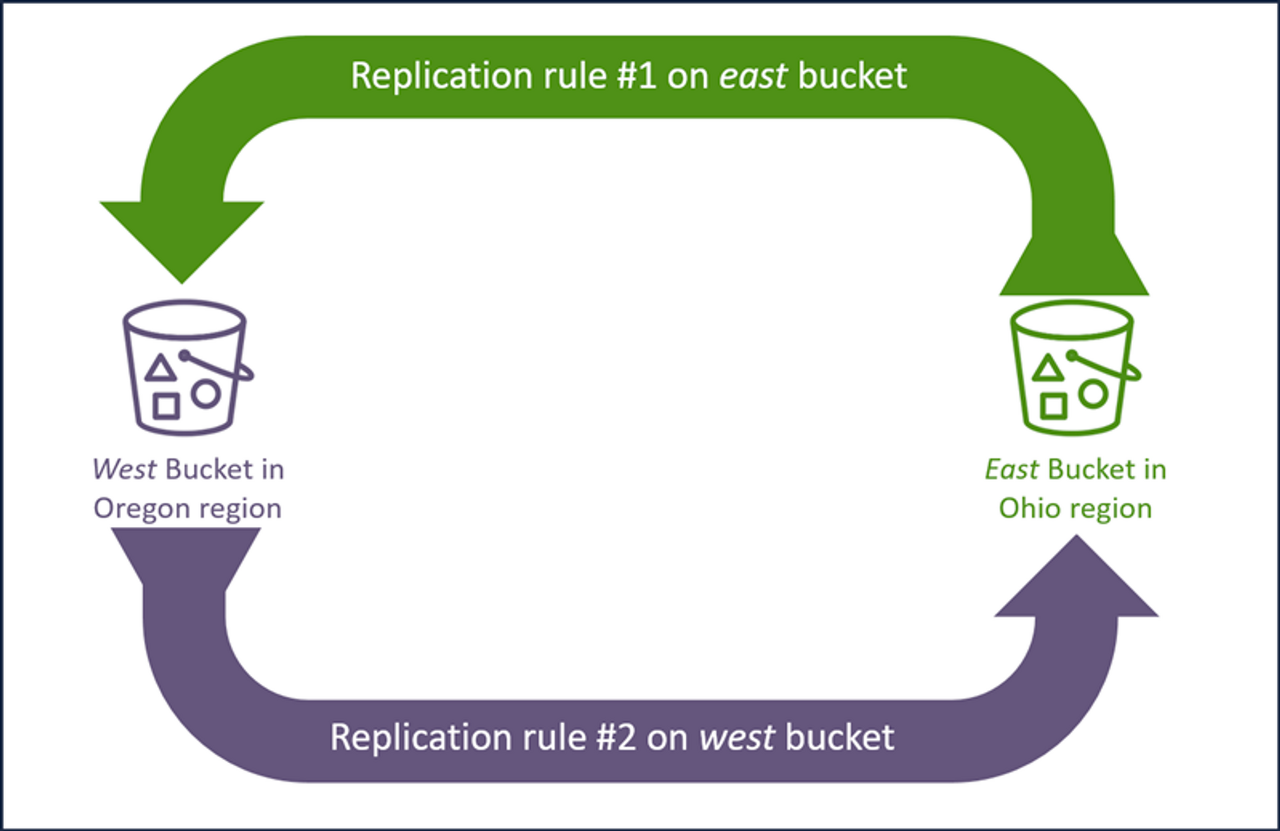
CloudFormation Stack을 사용하여 버킷을 생성합니다.
AWSTemplateFormatVersion: 2010-09-09
Description: >-
  AWS CloudFormation Sample Template for an encrypted Amazon S3 bucket with CloudTrail logging.

  **WARNING** You will be billed for the AWS resources created if you create a stack from this template.

  Copyright 2020 Amazon.com, Inc. or its affiliates. All Rights Reserved.

  Licensed under the Apache License, Version 2.0 (the "License").
  You may not use this file except in compliance with the License.
  A copy of the License is located at

      https://www.apache.org/licenses/LICENSE-2.0

  or in the "license" file accompanying this file. This file is distributed
  on an "AS IS" BASIS, WITHOUT WARRANTIES OR CONDITIONS OF ANY KIND, either
  express or implied. See the License for the specific language governing
  permissions and limitations under the License.

# Parameters

Parameters:

  # NamingPrefix is used to create S3 bucket names, and to name other resources such as IAM Roles
  NamingPrefix:
    Type: String
    Description: The naming prefix for resources created by this template including S3 buckets (minimum 5 characters)
    AllowedPattern: '(?=^.{5,40}$)(?!^(\d+\.)+\d+$)(^(([a-z0-9]|[a-z0-9][a-z0-9\-]*[a-z0-9])\.)*([a-z0-9]|[a-z0-9][a-z0-9\-]*[a-z0-9])$)'
    ConstraintDescription: minimum 5 characters; must contain only lowercase letters, numbers, periods (.), and dashes (-)

Resources:

  # ###########
  # The S3 bucket with encryption that we will use for replication.
  # and the IAM permissions necessary for replication
  # ###########

  S3BucketWithEncryption:
    Type: AWS::S3::Bucket
    Properties:
      AccessControl: Private
      BucketEncryption:
          ServerSideEncryptionConfiguration:
          - ServerSideEncryptionByDefault:
              SSEAlgorithm: "AES256"
      BucketName: !Sub '${NamingPrefix}-crrlab-${AWS::Region}'
      PublicAccessBlockConfiguration:
        BlockPublicAcls: true
        BlockPublicPolicy: true
        IgnorePublicAcls: true
        RestrictPublicBuckets: true
      VersioningConfiguration:
        Status: Enabled

  # see https://docs.aws.amazon.com/AmazonS3/latest/dev/setting-repl-config-perm-overview.html for an explanation of this IAM policy
  S3ReplicationPolicy:
    Type: AWS::IAM::ManagedPolicy
    Properties:
      Description: 'Policy used S3 for replication rules'
      ManagedPolicyName: !Sub '${NamingPrefix}-S3-Replication-Policy-${AWS::Region}'
      Path: /
      PolicyDocument:
        Version: 2012-10-17
        Statement:
            # Source S3 Bucket
          - Effect: Allow
            Action:
              - 's3:Get*'
              - 's3:ListBucket'
            Resource:
              - !Sub 'arn:aws:s3:::${NamingPrefix}-crrlab-${AWS::Region}'
              - !Sub 'arn:aws:s3:::${NamingPrefix}-crrlab-${AWS::Region}/*'
            # Destination S3 Bucket
          - Effect: Allow
            Action:
              - 's3:ReplicateObject'
              - 's3:ReplicateDelete'
              - 's3:ReplicateTags'
              - 's3:GetObjectVersionTagging'
            Resource: !Sub 'arn:aws:s3:::${NamingPrefix}-crrlab-*/*'

  S3ReplicationRole:
    Type: AWS::IAM::Role
    DependsOn: S3ReplicationPolicy
    Properties:
      RoleName: !Sub '${NamingPrefix}-S3-Replication-Role-${AWS::Region}'
      Path: /
      AssumeRolePolicyDocument:
        Version: 2012-10-17
        Statement:
          - Effect: Allow
            Principal:
              Service:
                - s3.amazonaws.com
            Action:
              - 'sts:AssumeRole'
      ManagedPolicyArns:
        - !Ref S3ReplicationPolicy

  # ###########
  # Resources necessary to enable CloudTrail logging on the S3 bucket
  # This includes an S3 bucket and CloudWatch Log Group that will receive the logs
  # and IAM permissions for CloudTrail to access to
  # write to the S3 and CloudWatch destinations
  # ###########

  # CloudTrail trail - enables ongoing delivery of events as log files
  # Specifically includes events from the S3BucketWithEncryption
  CloudTrailForLogs:
    Type: AWS::CloudTrail::Trail
    DependsOn:
      # This must be done first or Trail will fail because it does not have access to the S3 bucket
      - CloudTrailWriteToS3Policy
    Properties:
      CloudWatchLogsLogGroupArn: !Sub '${CloudWatchLogGroup.Arn}'
      CloudWatchLogsRoleArn: !Sub '${CloudTrailWriteToLogGroupRole.Arn}'
      EnableLogFileValidation: false
      EventSelectors:
        - DataResources:
          - Type: AWS::S3::Object
            Values:
              - !Sub 'arn:aws:s3:::${NamingPrefix}-crrlab-${AWS::Region}/'
          IncludeManagementEvents: false
          ReadWriteType: WriteOnly
      IncludeGlobalServiceEvents: false
      IsLogging: true
      IsMultiRegionTrail: false
      S3BucketName: !Ref LoggingBucket

  # S3 bucket to which CloudTrail will send logs
  LoggingBucket:
    Type: AWS::S3::Bucket
    Properties:
      AccessControl: BucketOwnerFullControl
      BucketName: !Sub 'logging-${NamingPrefix}-${AWS::Region}'

  # CloudWatch Log Group to which CloudTrail will send logs
  CloudWatchLogGroup:
    Type: AWS::Logs::LogGroup
    # Delete the Log Group when the stack is deleted
    DeletionPolicy: Delete
    Properties:
      LogGroupName: !Sub 'CloudTrail/logs/${NamingPrefix}'
      RetentionInDays: 30

  # Bucket policy gives CloudTrail permission to write to destination S3 bucket
  CloudTrailWriteToS3Policy:
    Type: AWS::S3::BucketPolicy
    Properties:
      Bucket: !Ref LoggingBucket
      PolicyDocument:
        Version: '2012-10-17'
        Statement:
        - Sid: AWSCloudTrailAclCheck
          Effect: Allow
          Principal:
            Service: 'cloudtrail.amazonaws.com'
          Action: 's3:GetBucketAcl'
          Resource: !Sub 'arn:aws:s3:::${LoggingBucket}'
        - Sid: AWSCloudTrailWrite
          Effect: Allow
          Principal:
            Service: 'cloudtrail.amazonaws.com'
          Action: 's3:PutObject'
          Resource: !Sub 'arn:aws:s3:::${LoggingBucket}/AWSLogs/${AWS::AccountId}/*'
          Condition:
            StringEquals:
              's3:x-amz-acl': 'bucket-owner-full-control'

  # IAM Role gives CloudTrail permission to write to destination CloudWatch Log Group
  CloudTrailWriteToLogGroupRole:
    Type: AWS::IAM::Role
    Properties:
      RoleName: !Sub '${NamingPrefix}-CloudTrailWriteToLogGroupRole-${AWS::Region}'
      Path: /
      AssumeRolePolicyDocument:
        Version: 2012-10-17
        Statement:
          - Effect: Allow
            Principal:
              Service:
                - cloudtrail.amazonaws.com
            Action:
              - 'sts:AssumeRole'
      Policies:
        # https://docs.aws.amazon.com/awscloudtrail/latest/userguide/send-cloudtrail-events-to-cloudwatch-logs.html
        - PolicyName: writeToLogGroup
          PolicyDocument:
            Version: 2012-10-17
            Statement:
              - Sid: AWSCloudTrailCreateLogStream20141101
                Effect: Allow
                Action:
                  - 'logs:CreateLogStream'
                Resource:
                  - !Sub 'arn:aws:logs:${AWS::Region}:${AWS::AccountId}:log-group:CloudTrail/logs/${NamingPrefix}:log-stream:*'
              - Sid: AWSCloudTrailPutLogEvents20141101
                Effect: Allow
                Action:
                  - 'logs:PutLogEvents'
                Resource:
                  - !Sub 'arn:aws:logs:${AWS::Region}:${AWS::AccountId}:log-group:CloudTrail/logs/${NamingPrefix}:log-stream:*'

# Outputs

Outputs:
  S3BucketName:
    Value: !Ref S3BucketWithEncryption
Description: S3 Bucket Nameus-east-2에 버킷을 배포합니다.
- 스택 생성 - 새 리소스 사용(표준)
- CloudFormation 템플릿 파일 및 템플릿 파일 업로드
- 옵션을 사용하여 CloudFormation 스택(새 리소스 포함)을 생성합니다.
- 스택 이름 S3-CRR-lab-east
- 매개변수
- 이것은 S3 버킷의 이름을 지정하는 데 사용됩니다.
- 5~40자 사이의 소문자, 숫자, 마침표(.) 및 대시(-)로 구성된 문자열이어야 합니다.
- 이것은 모든 S3에서 고유해야 하는 Amazon S3 버킷 이름의 일부입니다.
- 접근 가능한 장소에 이 값을 기록하십시오. 나중에 랩에서 다시 필요할 것입니다.
- 아래에 NamingPrefix를 입력합니다. (hmkim-crrtest)
- IAM 리소스를 승인해야 하는 페이지가 나타날 때까지 다음 페이지에서 다음을 클릭합니다 .
- 페이지 하단에서 AWS CloudFormation이 사용자 지정 이름으로 IAM 리소스를 생성할 수 있음을 인정합니다를 선택합니다.
- 스택 생성을 클릭합니다.
us-west-2에 버킷을 배포합니다.
- 이전과 동일한 CloudFormation 템플릿 파일과 템플릿 파일 업로드 옵션을 사용하여 CloudFormation 스택(새 리소스 포함)을 생성합니다 .
- 스택 이름 사용**S3-CRR-lab-west**
- 매개변수 아래에 NamingPrefix를 입력합니다.
- 이전과 동일한값을 사용해야 합니다.

- 이전과 동일한값을 사용해야 합니다.
- IAM 리소스를 승인해야 하는 페이지가 나타날 때까지 다음 페이지에서 다음을 클릭합니다 .
- 페이지 하단에서 AWS CloudFormation이 사용자 지정 이름으로 IAM 리소스를 생성할 수 있음을 인정합니다를 선택합니다.
- 스택 생성을 클릭합니다.
버킷 정보를 기록합니다

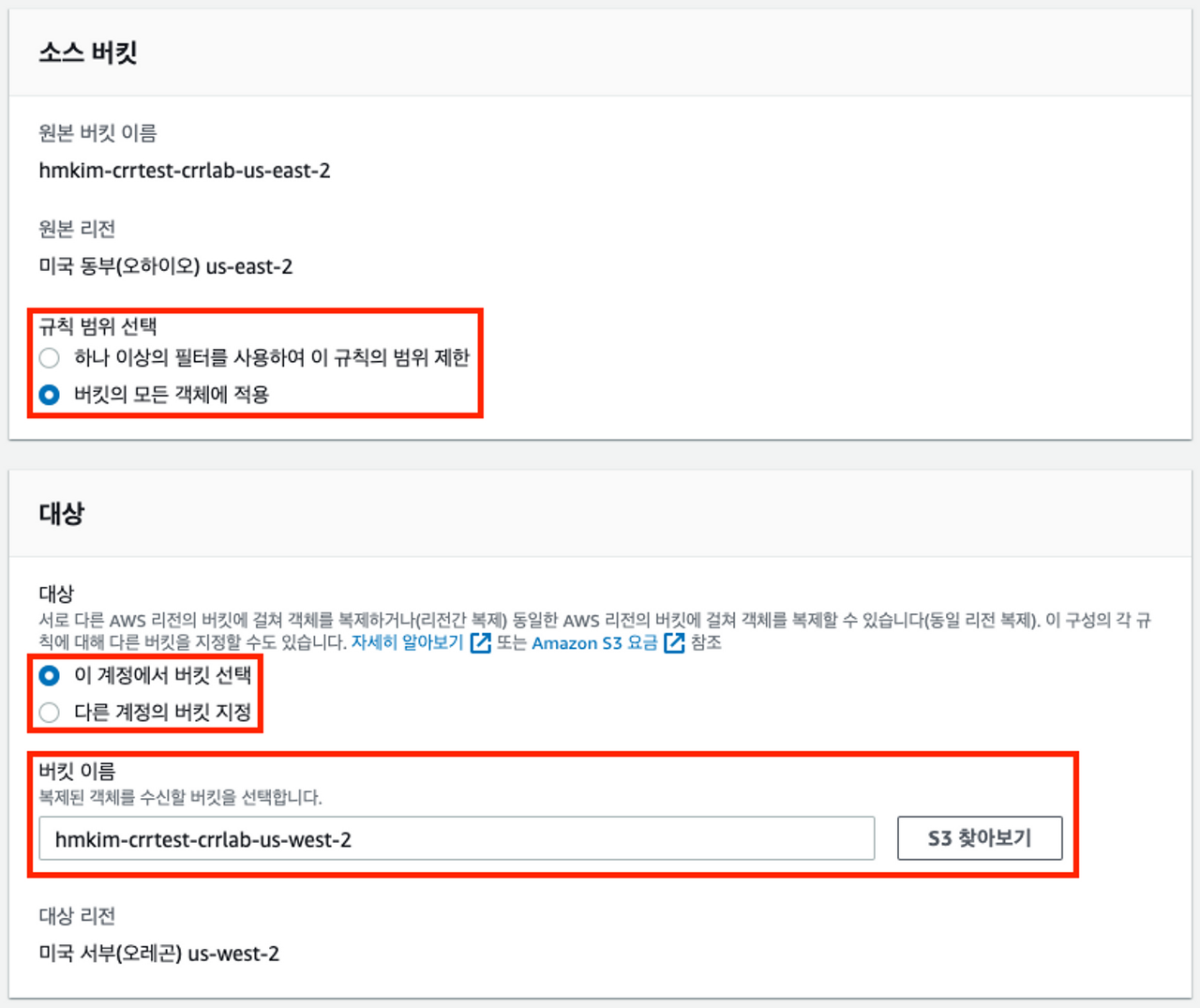
S3BucketName : hmkim-crrtest-crrlab-us-west-2

S3BucketName : hmkim-crrtest-crrlab-us-east-2
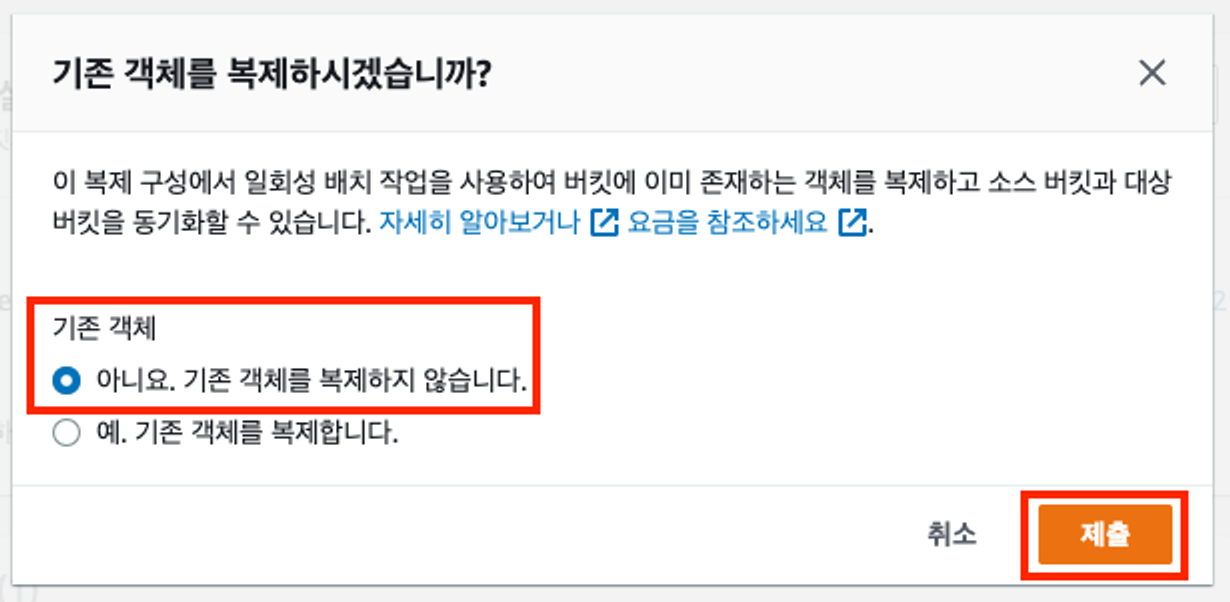
EAST → WEST 규칙 설정
버킷을 선택합니다.
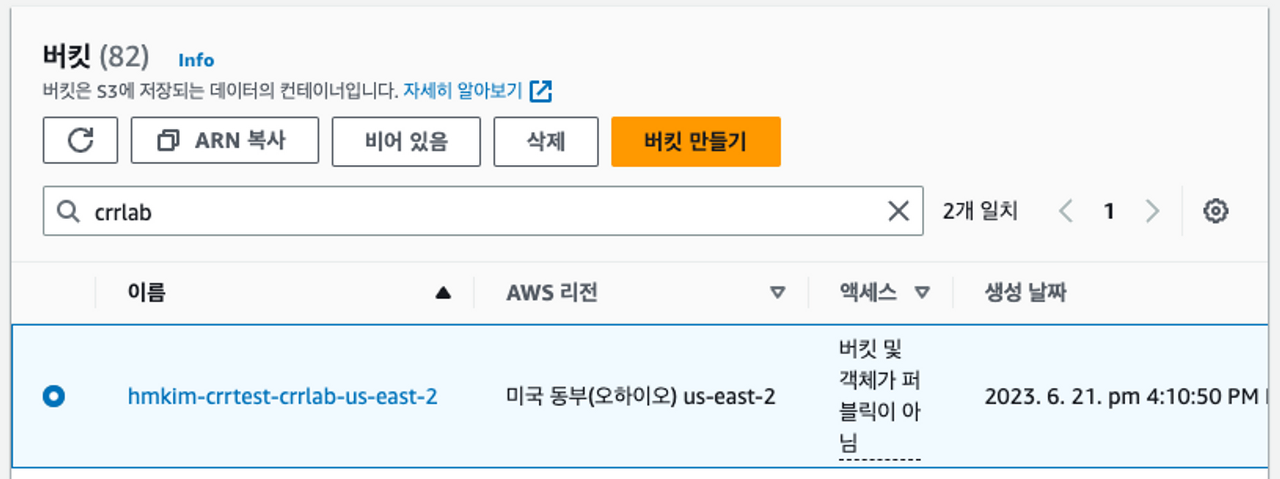
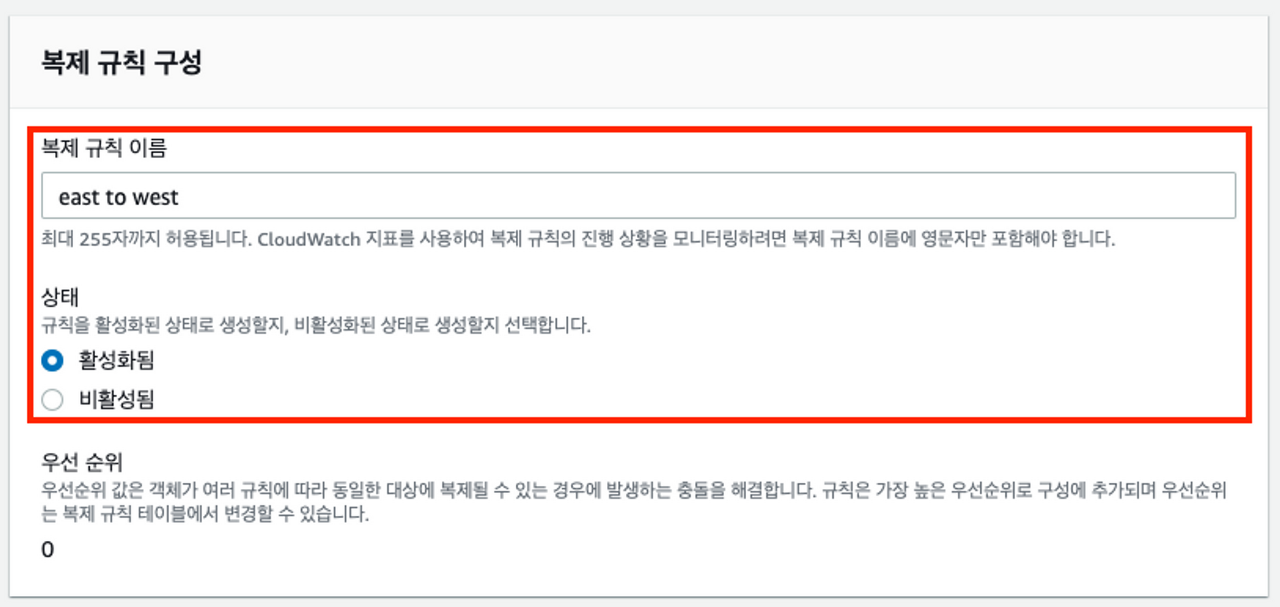
복제 규칙을 생성합니다.
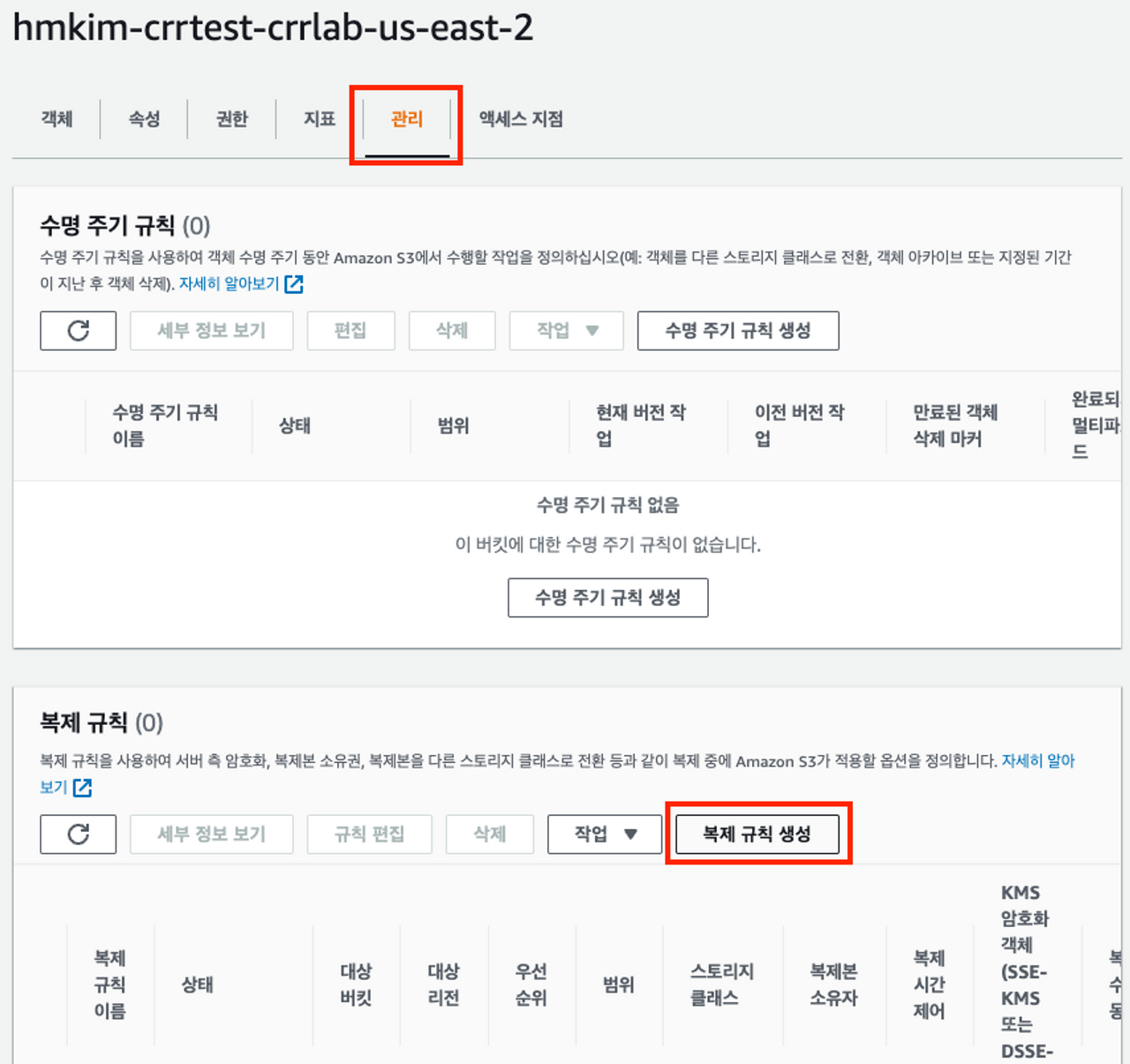
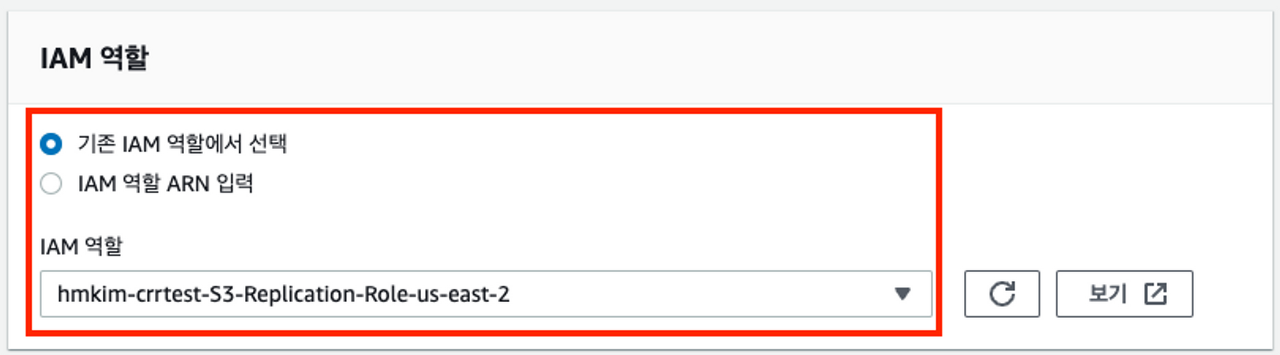
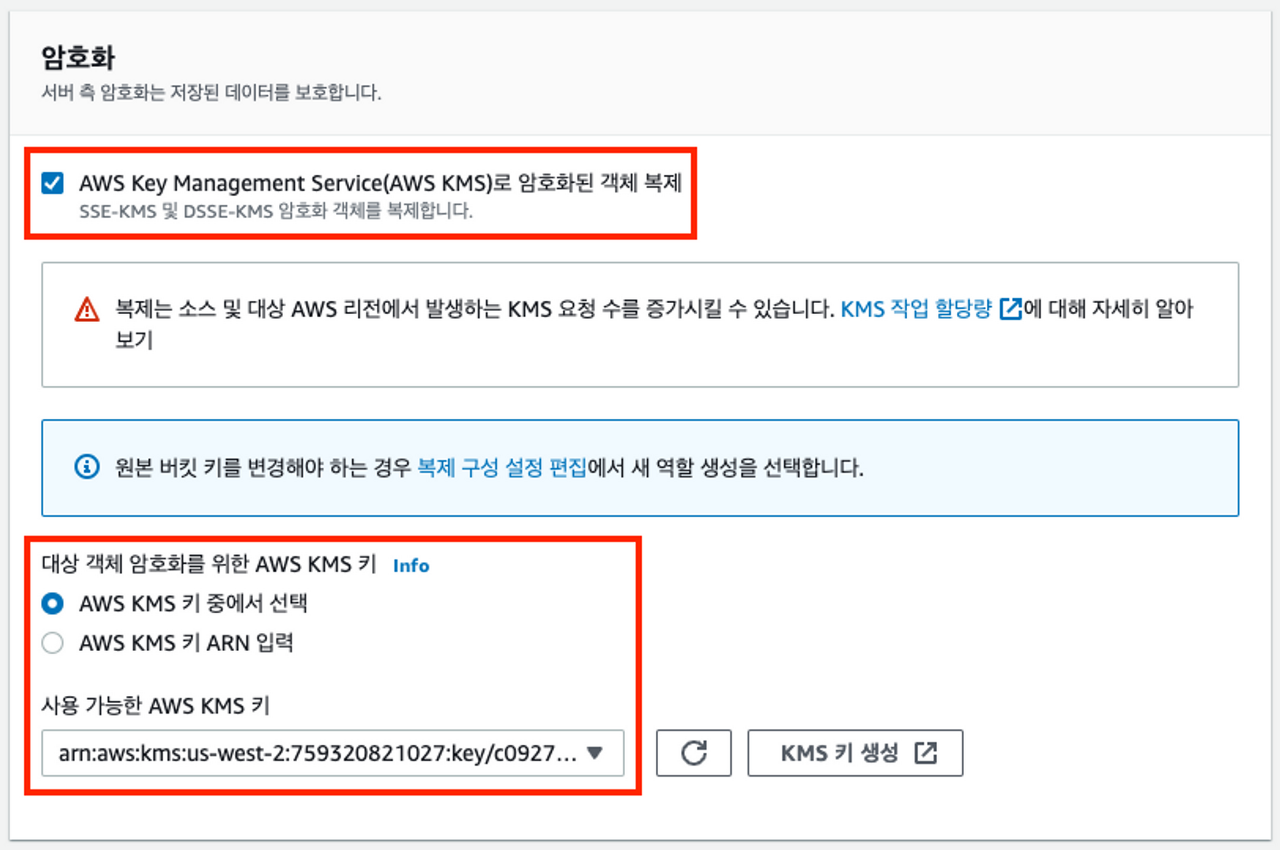
복제 규칙 설정
{
    "Version": "2012-10-17",
    "Statement": [
        {
            "Action": [
                "s3:Get*",
                "s3:ListBucket"
            ],
            "Resource": [
                "arn:aws:s3:::hmkim-crrtest-crrlab-us-east-2",
                "arn:aws:s3:::hmkim-crrtest-crrlab-us-east-2/*"
            ],
            "Effect": "Allow"
        },
        {
            "Action": [
                "s3:ReplicateObject",
                "s3:ReplicateDelete",
                "s3:ReplicateTags",
                "s3:GetObjectVersionTagging"
            ],
            "Resource": "arn:aws:s3:::hmkim-crrtest-crrlab-*/*",
            "Effect": "Allow"
        }
    ]
}
EAST → WEST 테스트
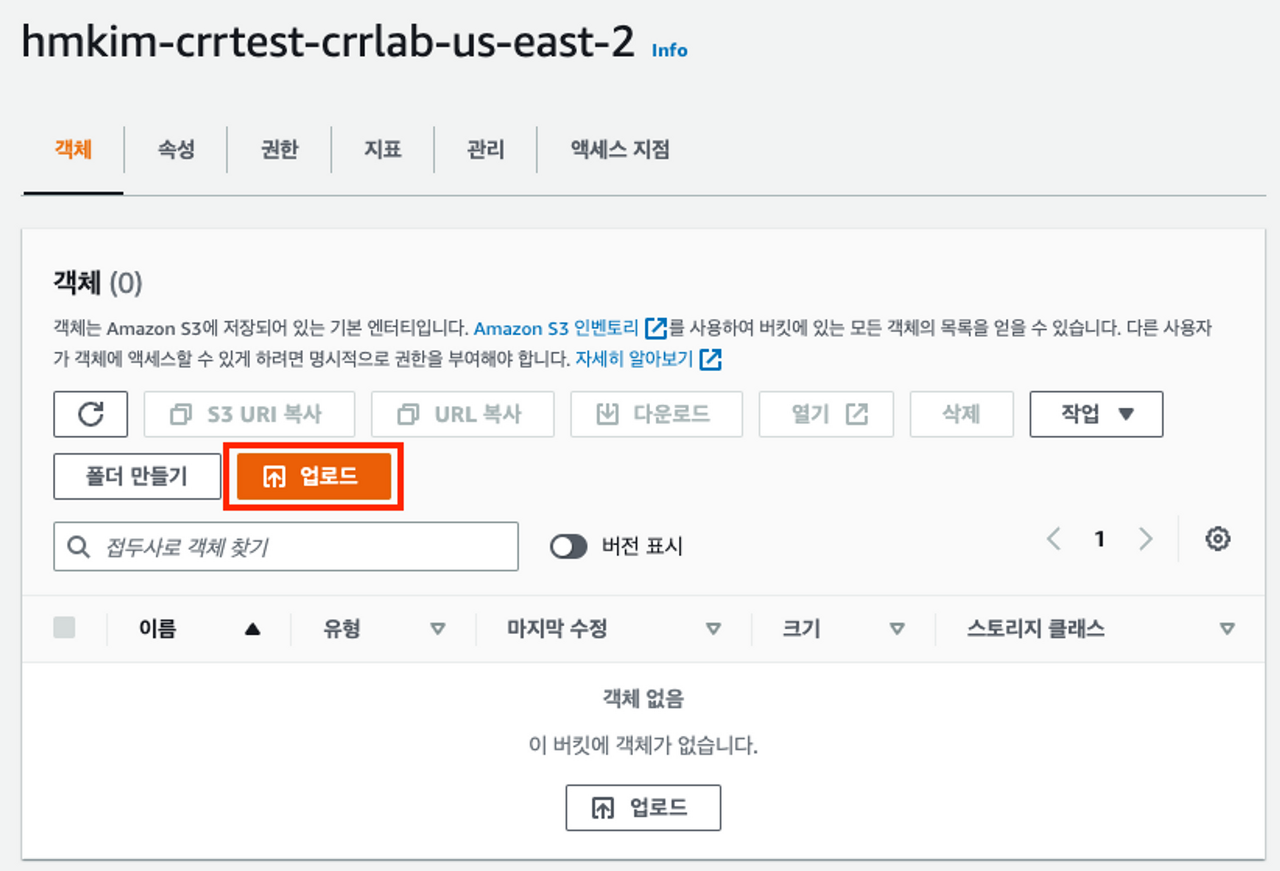
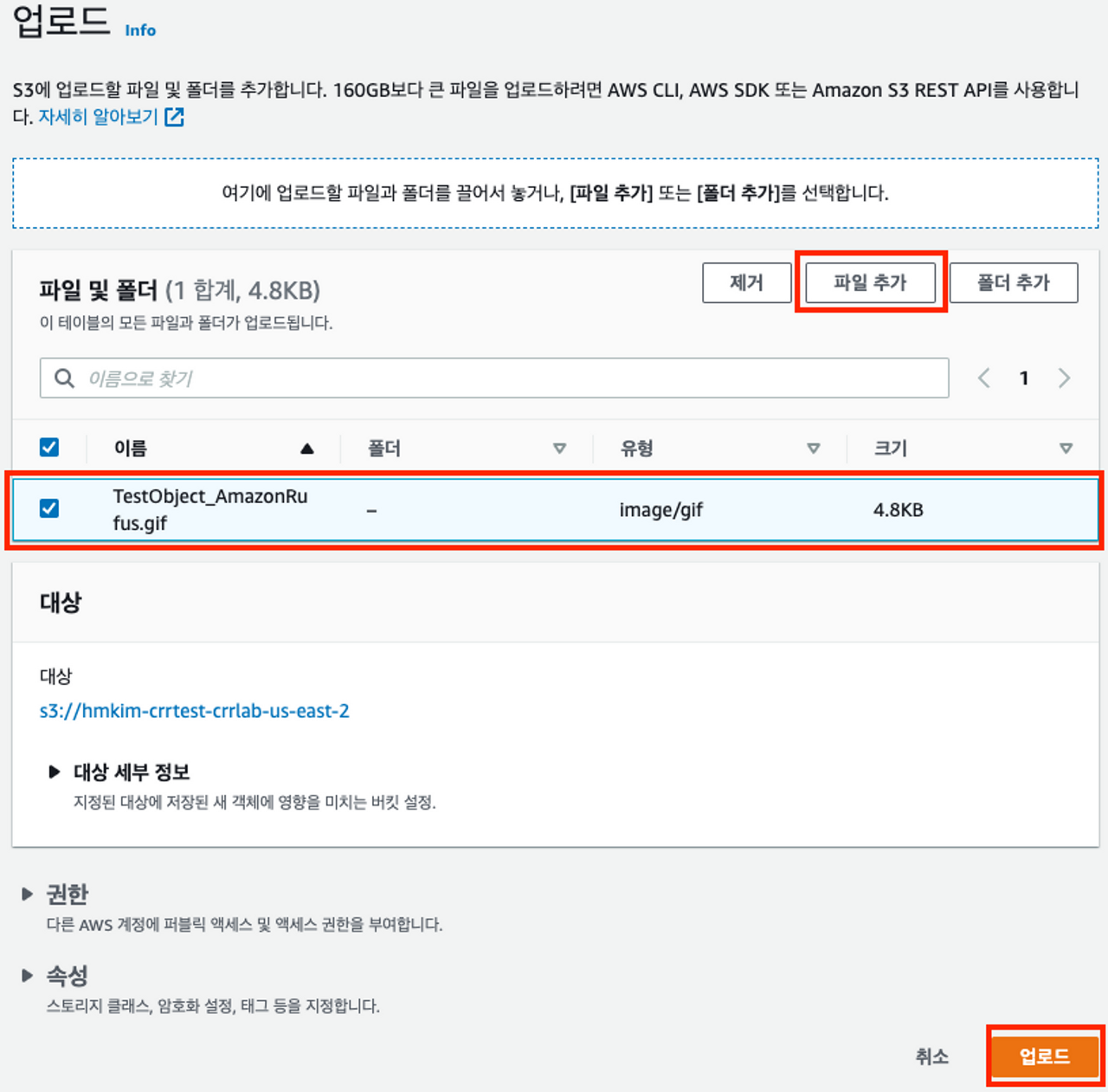
테스트용 이미지

업로드
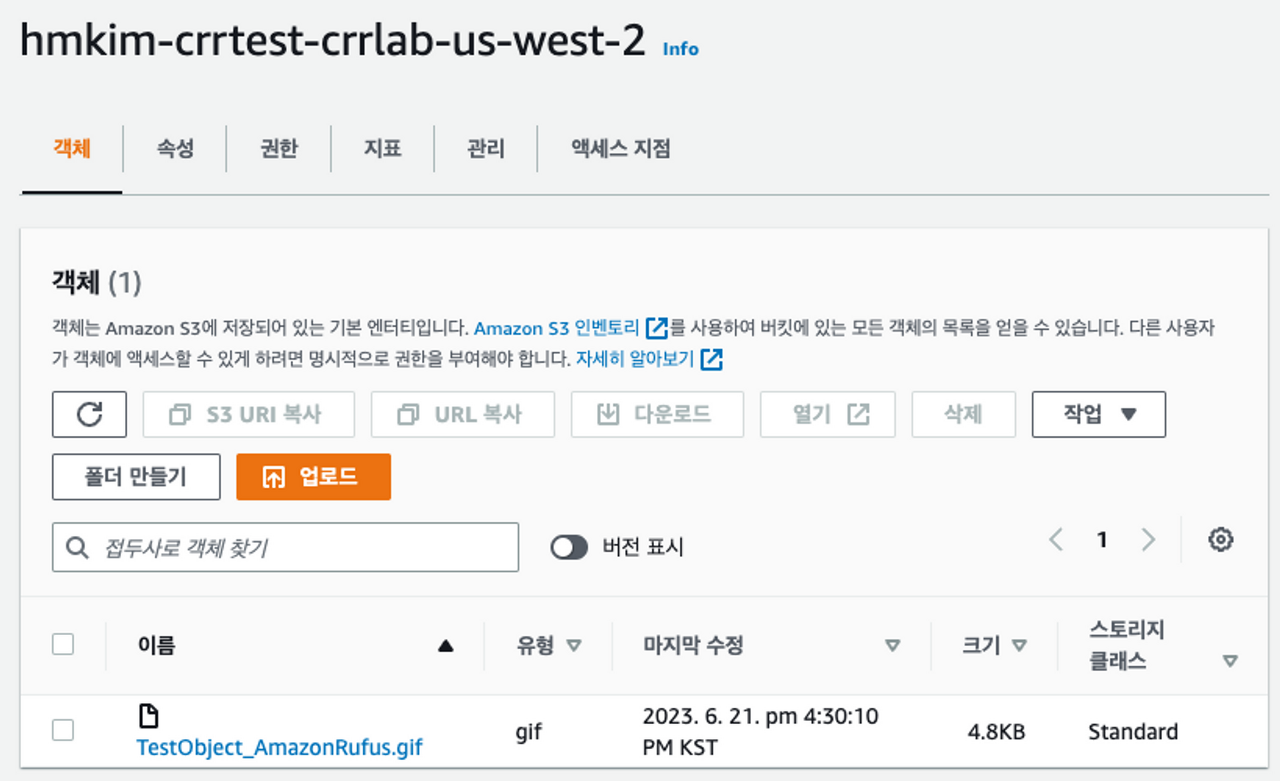
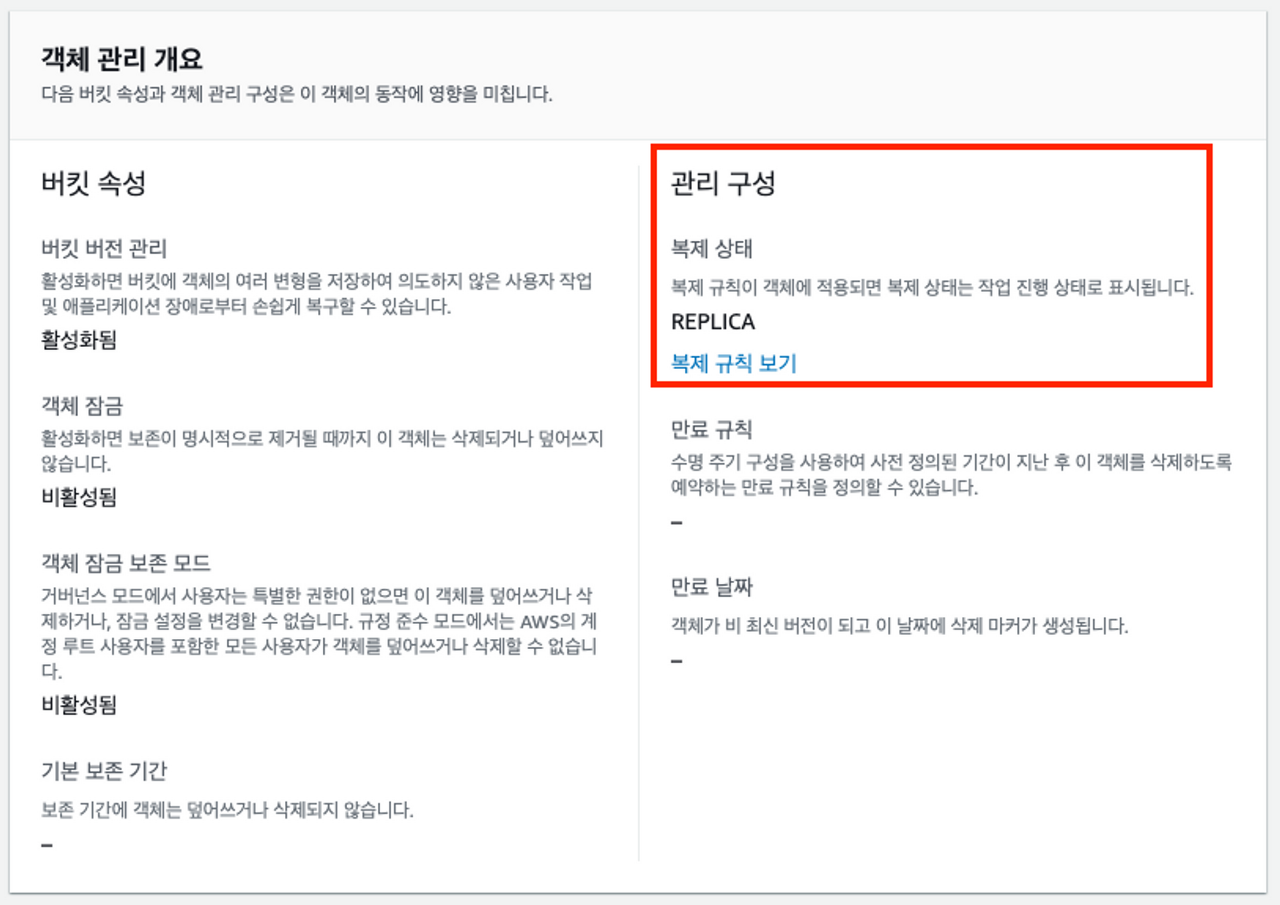
west 버킷에서 확인합니다.
WEST → EAST 규칙 설정
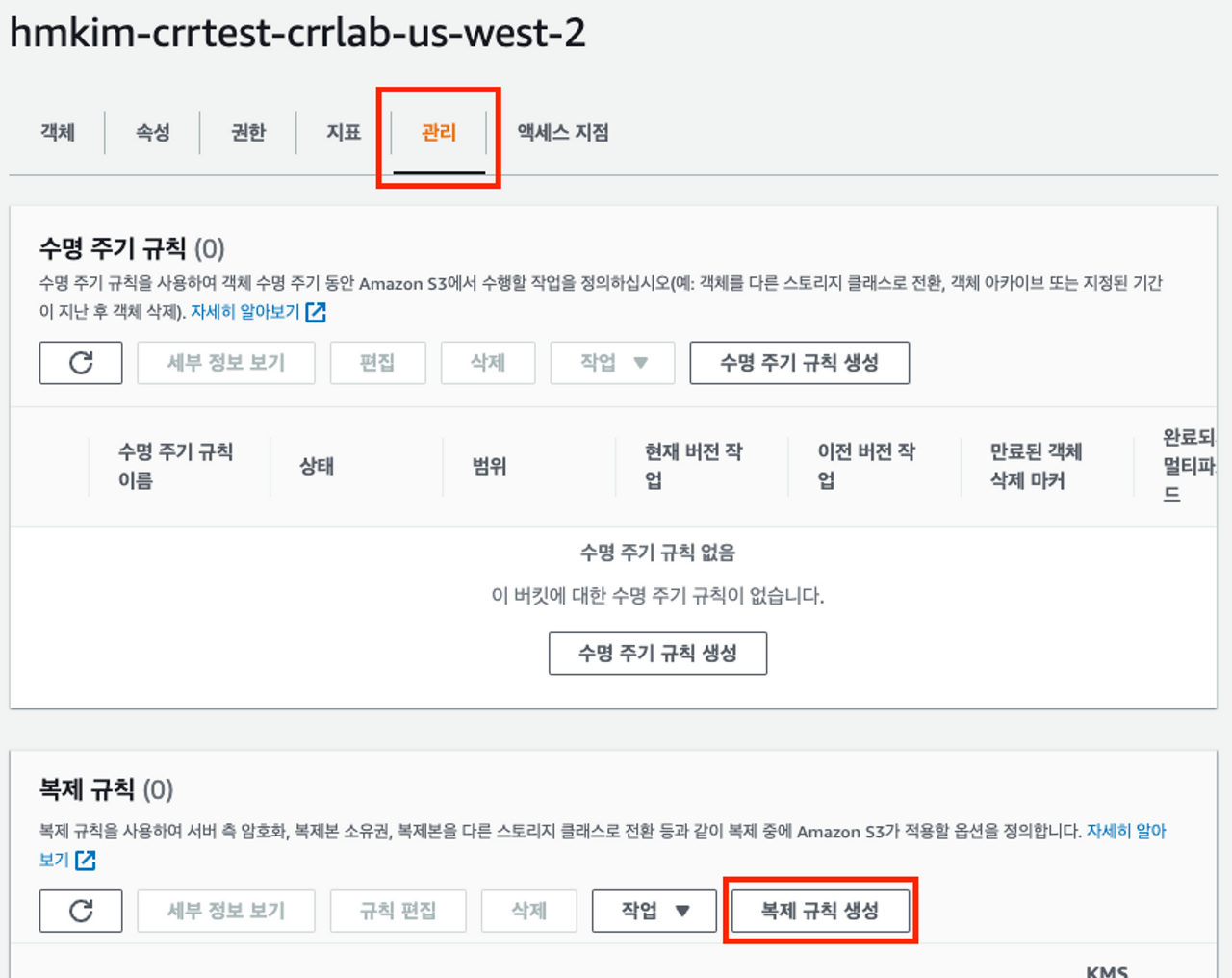
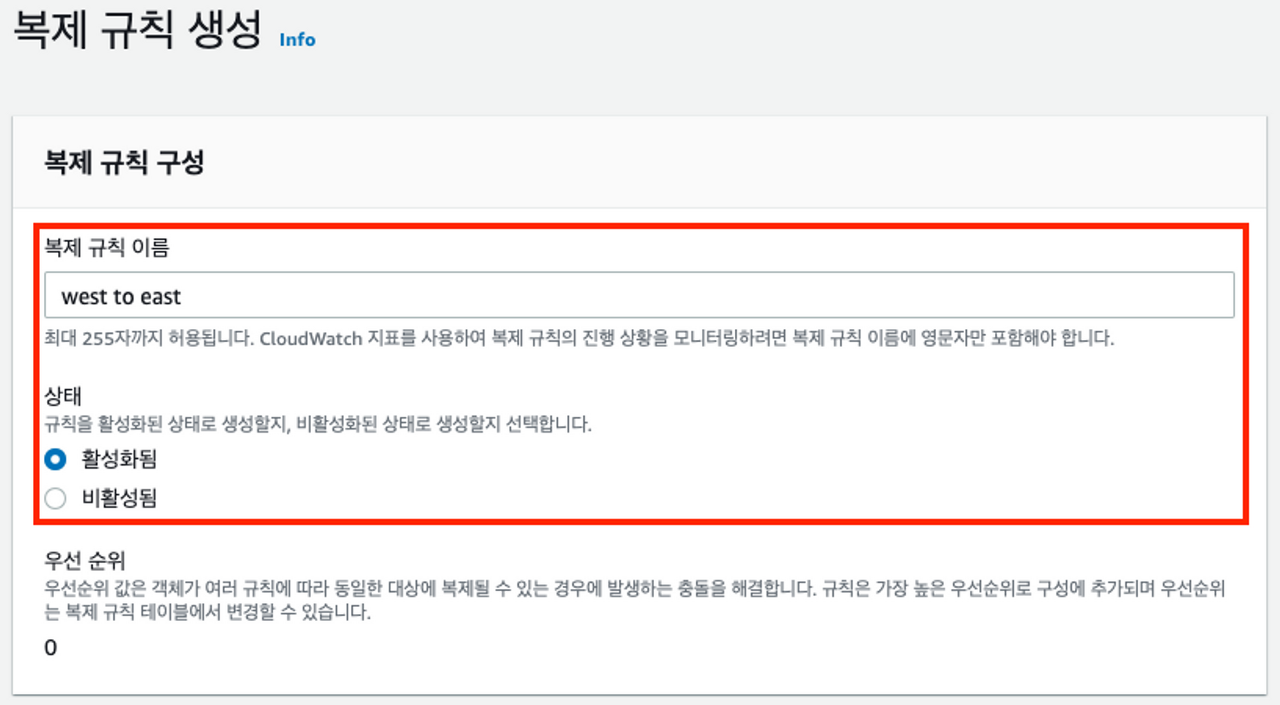
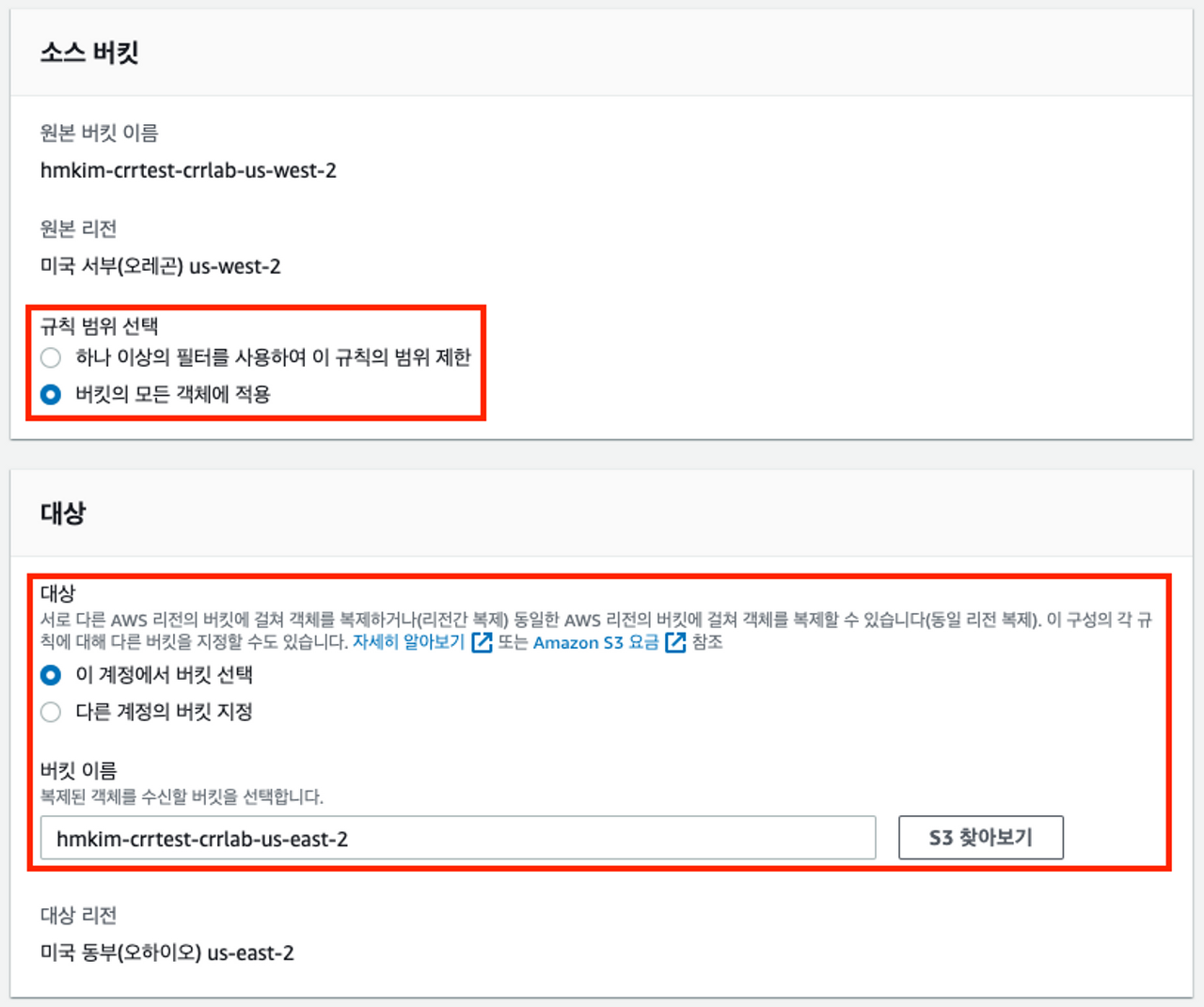
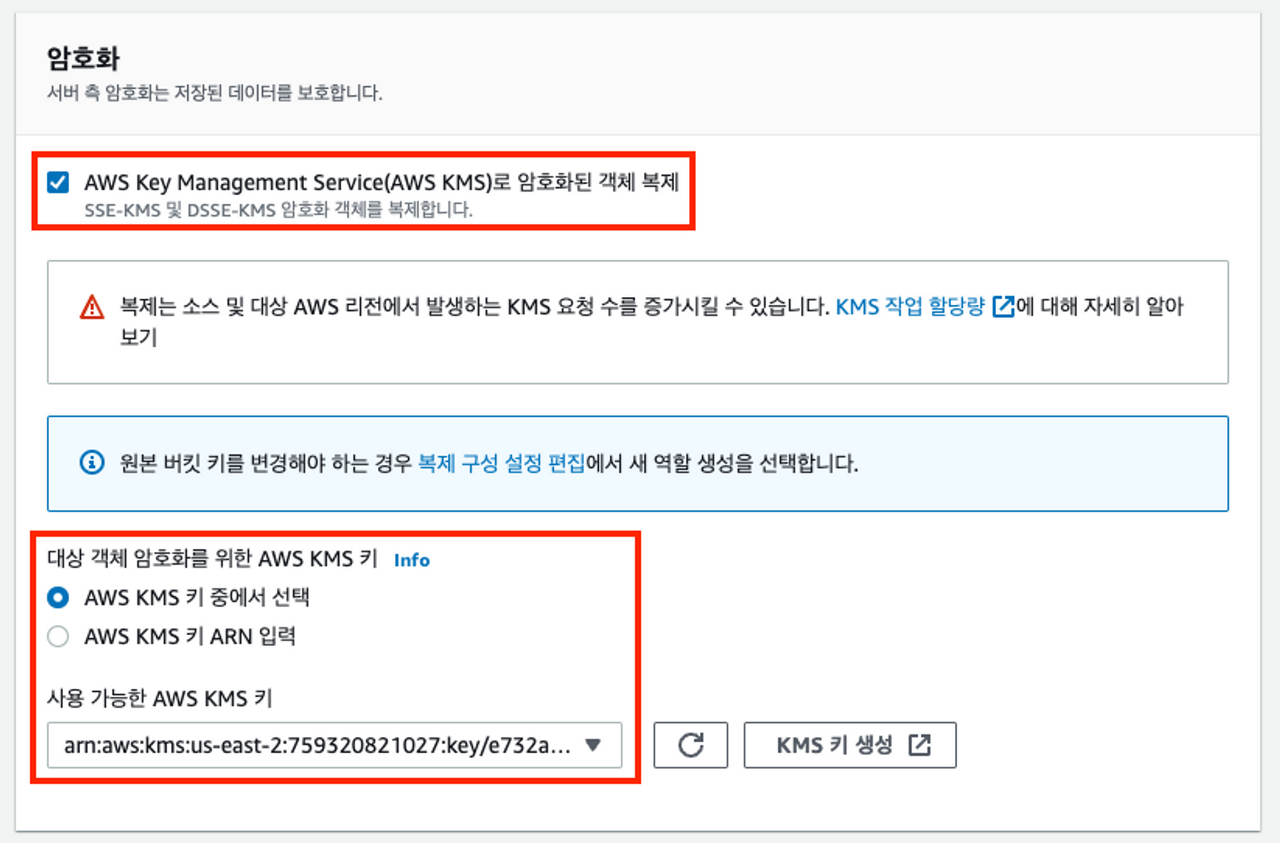
east버킷과 동일하게 복제규칙을 생성합니다.
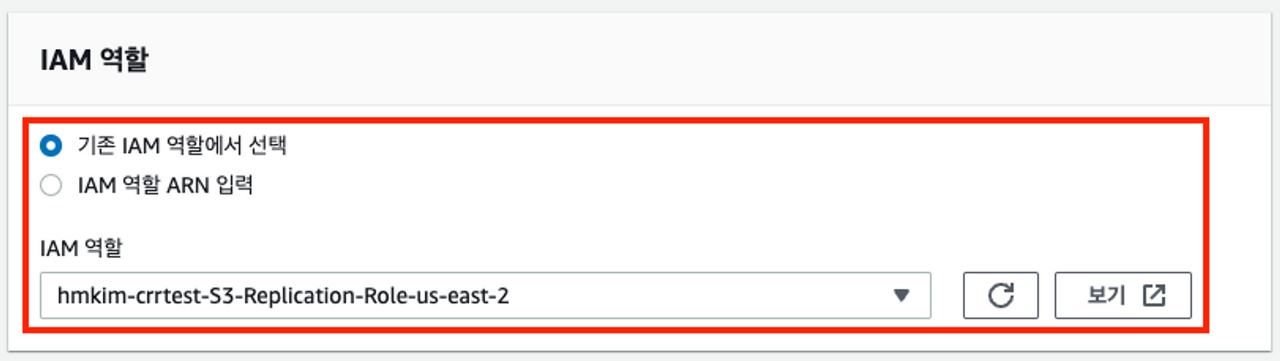
{
    "Version": "2012-10-17",
    "Statement": [
        {
            "Action": [
                "s3:Get*",
                "s3:ListBucket"
            ],
            "Resource": [
                "arn:aws:s3:::hmkim-crrtest-crrlab-us-east-2",
                "arn:aws:s3:::hmkim-crrtest-crrlab-us-east-2/*"
            ],
            "Effect": "Allow"
        },
        {
            "Action": [
                "s3:ReplicateObject",
                "s3:ReplicateDelete",
                "s3:ReplicateTags",
                "s3:GetObjectVersionTagging"
            ],
            "Resource": "arn:aws:s3:::hmkim-crrtest-crrlab-*/*",
            "Effect": "Allow"
        }
    ]
}
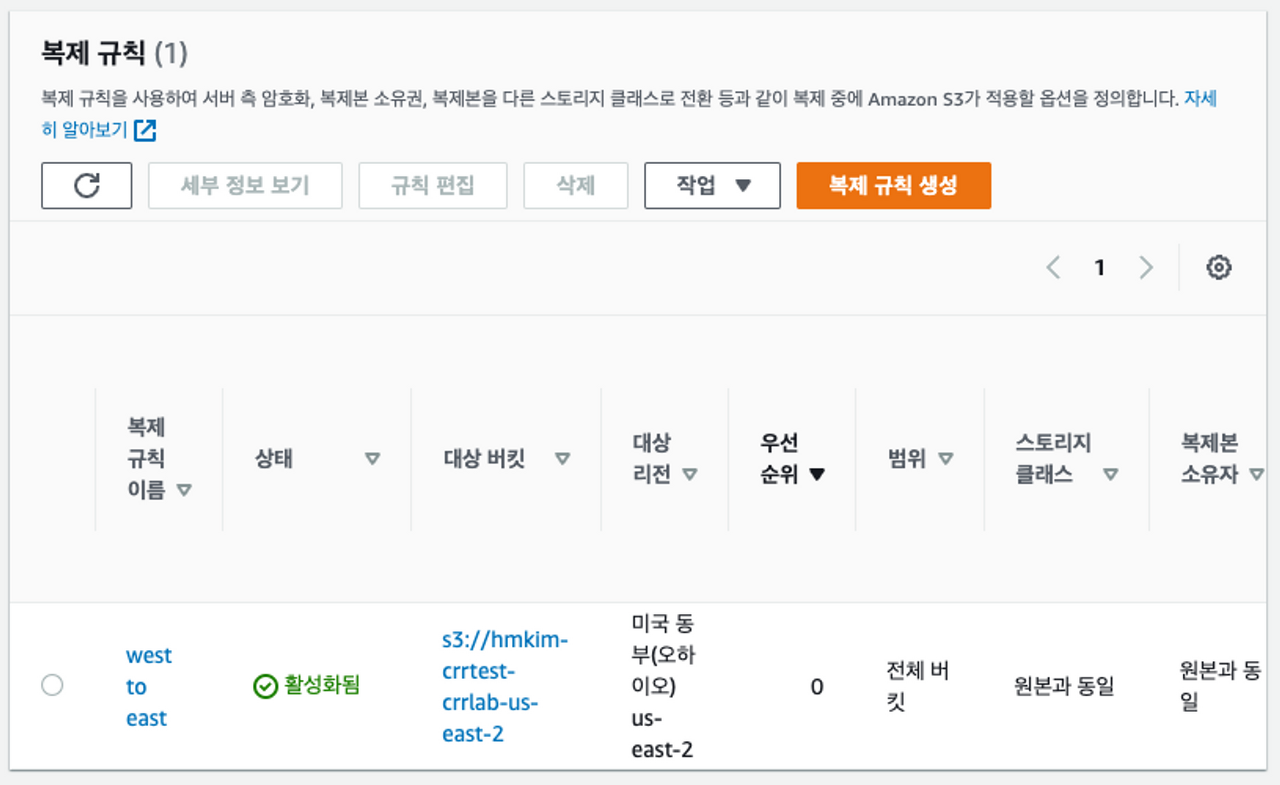
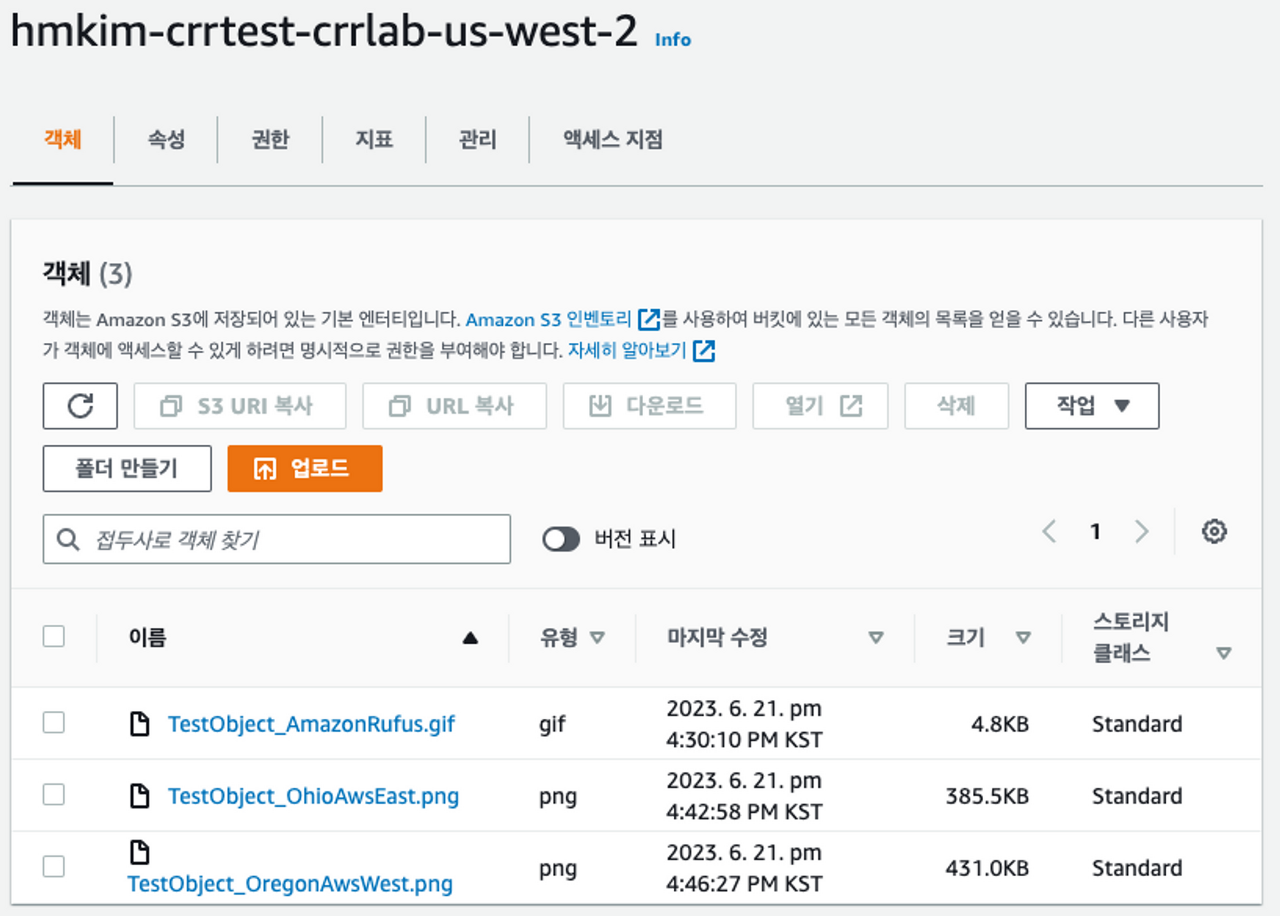
양방향 교차 리전 복제(CRR) 테스트
파일 #1
파일 #2
EAST버킷에 파일 #1을 업로드합니다.
WEST버킷에 파일 #2를 업로드합니다.